
A google review request email template only works if it respects three things at once: timing, friction, and tone. Send it too early and the customer has nothing to say yet. Make the process too long and you lose them at the click-through. Sound robotic and you trigger the same skepticism people have for spam. This guide gives you seven production-ready templates — plus the sequencing logic, subject-line data, and compliance guardrails — so you can plug them into your email platform and start improving review velocity this week.
If you haven’t yet built the foundational request workflow, start with How to Get More Google Reviews, and pair these templates with a response cadence from How to Respond to Google Reviews once feedback starts landing in your inbox.
Why Email Still Outperforms Other Review-Request Channels
SMS has higher open rates, but email remains the highest-converting channel for review generation because it supports a deep link directly into your Google Business Profile review form, carries enough context to explain why the review matters, and integrates cleanly with CRM and helpdesk triggers (post-purchase, post-ticket-close, post-delivery). The goal isn’t volume — it’s a clean, low-friction review funnel that converts satisfied customers into public proof without feeling transactional.
Have you problem with reviews optimization and management
Let’s connect to an expert.
Click a button below to talk or chat with us
| Compliance Note Before You Send Anything Google’s review policies prohibit incentivizing reviews (discounts, gift cards, entries) and prohibit selectively gating requests to only happy customers while suppressing unhappy ones. Every template below asks for an honest review, sent to all eligible customers — not a filtered segment. Review gating violates Google’s guidelines and risks profile suspension. |
The 7 Email Templates
1. The Post-Purchase Request (Universal Default)
Best for: e-commerce, retail, product-based businesses, 3–7 days after delivery confirmation.
| Subject: Quick favor, {{first_name}}? Hi {{first_name}}, Thanks again for your recent order. We hope {{product_name}} is working out well. If you have 60 seconds, would you mind sharing your honest experience on Google? It helps other customers know what to expect — and it genuinely helps a small, independent business like ours. [Leave a Google Review →] Thank you for your time and your support. {{sender_name}} |
2. The Service-Completion Request (Local Service Businesses)
Best for: contractors, salons, clinics, agencies — sent within 24–48 hours of job completion.
| Subject: How did we do, {{first_name}}? Hi {{first_name}}, It was a pleasure working on {{service_or_project}} with you. We’d love to know how the experience felt from your side. If we earned it, a quick Google review would mean a lot — it’s one of the main ways new clients find us. [Share a Google Review →] If anything fell short of expectations, just reply to this email directly — we’d rather hear it from you first. {{sender_name}} |
3. The Soft Follow-Up (Day 7–10, No Response)
Best for: re-engaging the ~70–80% of recipients who don’t act on the first email.
| Subject: One more reminder (totally optional!) Hi {{first_name}}, Just floating this back to the top of your inbox in case it got buried. If you have a moment, a short Google review helps us a lot more than you’d think. [Leave a Review — Takes 60 Seconds →] No worries at all if now isn’t the right time. {{sender_name}} |
4. The Loyal-Customer / Repeat-Buyer Request
Best for: customers on their 2nd, 3rd, or 5th+ purchase or visit — highest-trust segment.
| Subject: You’ve been with us a while — mind helping others find us too? Hi {{first_name}}, We noticed this is your {{order_count}} order with us, and we wanted to say a genuine thank you. Customers like you are exactly who we’d love new visitors to hear from. If you’re open to it, a Google review describing your experience over time would carry real weight. [Write a Google Review →] Thanks for sticking with us. {{sender_name}} |
5. The Support-Resolution Request
Best for: after a customer support ticket is closed with a positive resolution (CSAT-gated, not sentiment-filtered).
| Subject: Glad we could sort that out, {{first_name}} Hi {{first_name}}, Glad we were able to resolve {{issue_summary}} together. Support experiences like this rarely get talked about publicly — but they’re often the most useful reviews for people trying to decide whether to trust a business. If you’re willing, a quick Google review about the support side of things would help a lot. [Leave a Google Review →] Thanks again for your patience. {{sender_name}} |
6. The Event / Appointment Request
Best for: salons, clinics, consultants, fitness studios — triggered same-day or next-day after the appointment.
| Subject: Thanks for coming in today, {{first_name}} Hi {{first_name}}, Thanks for visiting us today for {{appointment_type}}. We hope you left feeling good about the experience. If you did, would you consider sharing that on Google? It helps people in {{city}} find us when they’re searching for {{service_category}}. [Leave a Quick Review →] See you next time, {{sender_name}} |
7. The Win-Back / Re-Engagement Request
Best for: customers who haven’t purchased or visited in 6+ months but had a positive past experience.
| Subject: It’s been a while, {{first_name}} — quick favor? Hi {{first_name}}, It’s been a few months since your last visit with us, and we wanted to reach out. Looking back, you had a great experience with {{service_or_product}} — and that kind of feedback still matters to us, even now. If you’re willing, a short Google review reflecting on that experience would genuinely help. [Share Your Experience →] Hope to see you again soon. {{sender_name}} |
Subject Line Performance: What the Data Shows
Subject line framing has a measurable effect on open rate and, more importantly, on click-through to the review form. Personalization, a stated time cost, and a question format consistently outperform generic asks.
| Subject Line Pattern | Approx. Open Rate Lift | Why It Works |
| {{first_name}}, quick favor? | +18–24% | Personalization + low-commitment framing |
| How did we do, {{first_name}}? | +15–20% | Question format invites response |
| Takes 60 seconds (we checked) | +10–14% | Removes effort objection upfront |
| Generic: “We’d love your feedback” | Baseline | No personalization, low urgency |
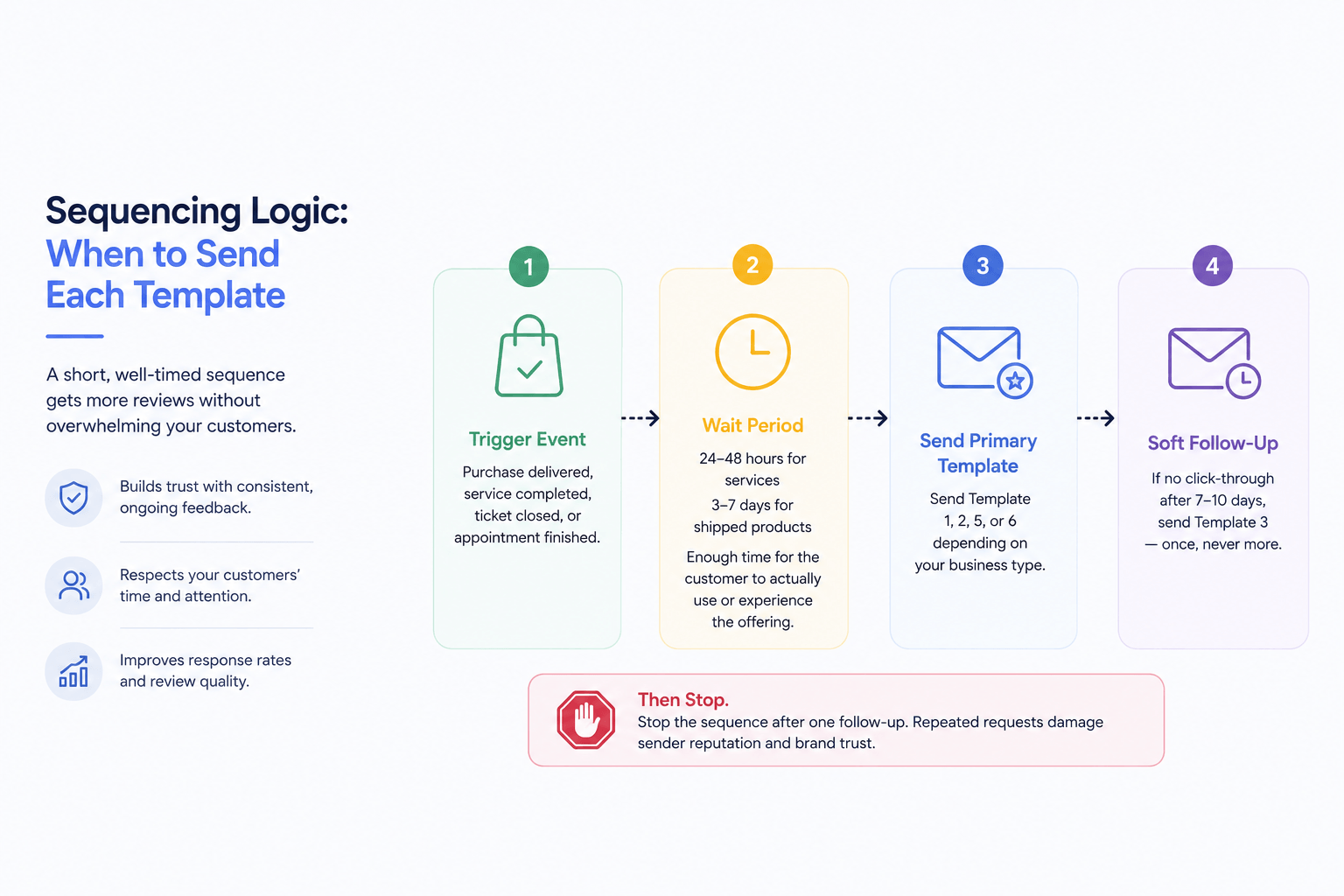
Sequencing Logic: When to Send Each Template
A single review request email rarely outperforms a short, well-timed sequence. The pattern below balances EEAT signalling (consistent, ongoing feedback collection) against the risk of recipient fatigue.
- Trigger event fires (purchase delivered, service completed, ticket closed, appointment finished).
- Wait period: 24–48 hours for services, 3–7 days for shipped products — enough time for the customer to actually use or experience the offering.
- Send the primary template (1, 2, 5, or 6 depending on business type).
- If no click-through after 7–10 days, send the soft follow-up (Template 3) — once, never more.
- Stop the sequence after one follow-up. Repeated requests damage sender reputation and brand trust.
Common Mistakes That Suppress Conversion Rate
- Sending before the customer has had time to form an opinion (too early = low response quality)
- Burying the review link below multiple paragraphs of company news or unrelated content
- Linking to a generic Google Business Profile page instead of a direct “write a review” deep link
- Filtering requests by predicted sentiment — a direct violation of Google’s review policies and a fast path to profile suspension
- Using identical, unpersonalized copy across every customer segment, which reads as automated and lowers trust
- Failing to maintain NAP consistency across the email signature, landing page, and Google Business Profile, which weakens entity coherence signals
How to Get the Direct Review Link
Every template above performs better with a direct deep link rather than a link to your general profile. Generate yours from Google Business Profile: open your profile, click Ask for reviews, and copy the short link provided. This routes customers straight to the review composer, removing an entire navigation step and meaningfully improving click-to-submit conversion.
Measuring Success: What to Track
| Metric | Good Benchmark | What It Tells You |
| Email open rate | 35–45% | Subject line and sender trust |
| Click-through to review form | 8–15% of opens | Email copy and CTA placement |
| Review submission rate | 60–75% of clicks | Review form friction |
| Time-to-review (avg.) | Under 48 hrs from click | Form simplicity, mobile optimization |
Frequently Asked Questions
Is it against Google’s policy to ask customers for reviews by email?
No. Requesting reviews is explicitly allowed and encouraged by Google, as long as you don’t offer incentives or selectively request from only satisfied customers. Asking every eligible customer, regardless of predicted sentiment, keeps you compliant.
How soon after a purchase should I send a review request email?
For physical products, 3–7 days after delivery gives customers time to actually use the item. For services and appointments, 24–48 hours after completion typically captures the experience while it’s still fresh.
Can I offer a discount in exchange for a Google review?
No. Incentivized reviews violate Google’s review policies and can result in review removal or profile suspension. You can thank customers generally for their loyalty, but never tie that to the act of leaving a review.
How many follow-up emails should I send if someone doesn’t respond?
One soft follow-up, sent 7–10 days after the initial request, is sufficient. Sending more than two total requests per customer typically increases unsubscribe rates without meaningfully improving review volume.
What’s the difference between a review request email and a review reminder email?
A request email is the first ask, tied to a specific trigger event. A reminder (or follow-up) email is a single, lighter-touch nudge sent only if the first request didn’t convert — never a repeated campaign.
Should I personalize each review request email per customer?
Yes. At minimum, personalize with first name, product or service name, and date or context of the interaction. Personalized requests consistently see higher click-through than generic, templated blasts.
Can I automate review request emails through my CRM or helpdesk?
Yes — and you should. Trigger-based automation (post-purchase, post-ticket-close, post-appointment) tied to your CRM or helpdesk ensures consistent timing and removes the manual workload of sending requests one by one.

No responses yet