
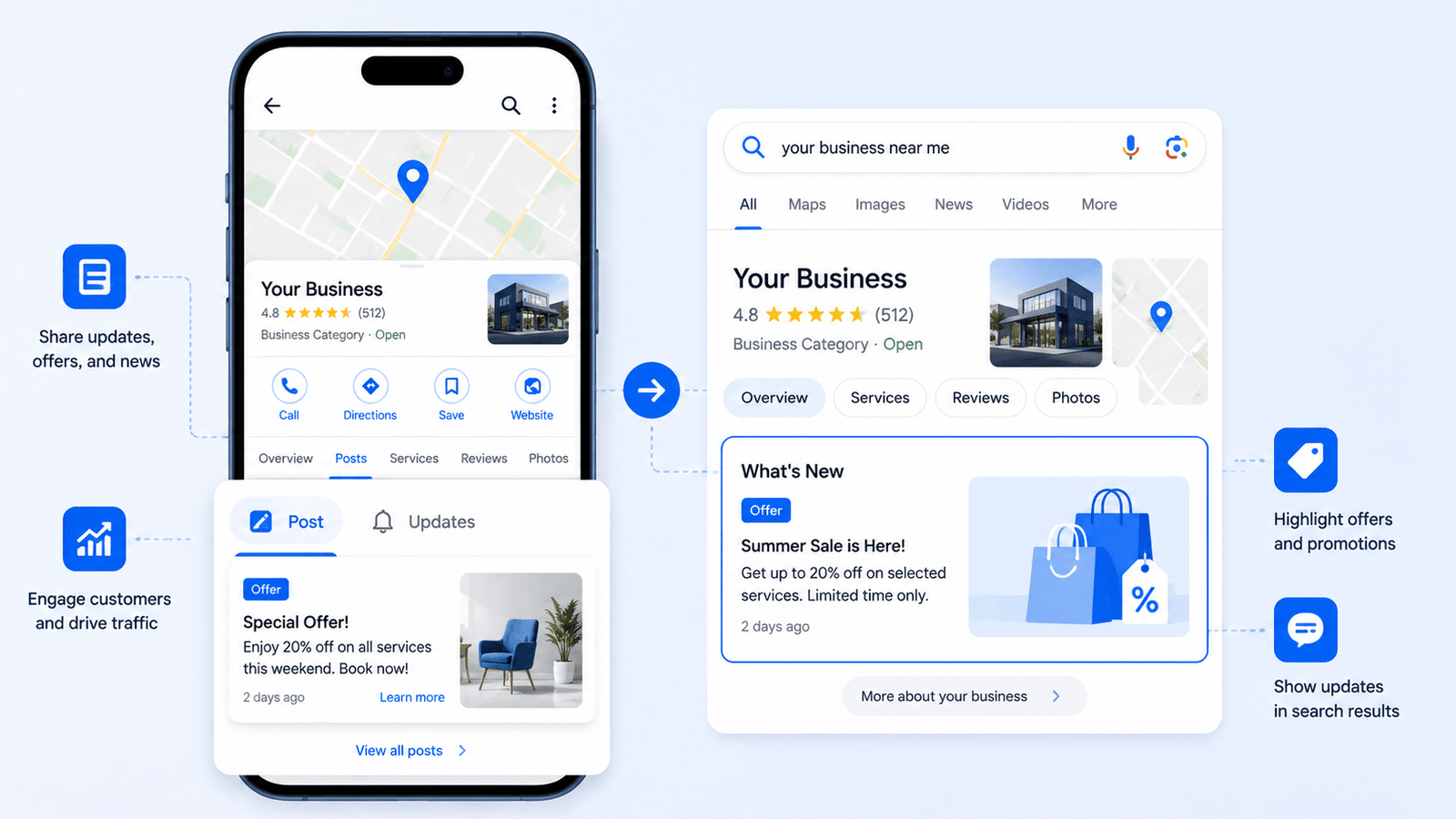
Google Business Profile Posts are one of the most underused features in local SEO — and that’s exactly why they represent a real competitive advantage for businesses that use them consistently. While your competitors are ignoring this built-in content channel, you can publish updates, limited-time offers, events, and product announcements that appear directly on Google Search and Maps the moment someone searches for your business. In this guide, you’ll learn what GBP posts are, how each post type works, and a practical posting system that turns your Business Profile into an active traffic and conversion tool.
What Are Google Business Profile Posts?
Google Business Profile Posts are short, time-sensitive content updates that appear on your Business Profile in Google Search and Google Maps. They work like mini announcements — visible to anyone who finds your listing, giving them a reason to take action right now instead of scrolling past.
Posts appear in the “Updates” or “From the owner” section of your Business Profile panel. On mobile, they are prominently displayed. On desktop, they sit just below your core business information. Either way, they are in a high-visibility zone that most local competitors leave completely empty.
Unlike social media posts, GBP posts are indexed by Google and contribute directly to your local search presence. According to Google’s official Business Profile support documentation, posts allow businesses to share timely updates and promotions directly with customers on Search and Maps — making them a direct local SEO signal, not just a content exercise.
The 4 Types of Google Business Profile Posts
Understanding each post type is essential before you start publishing. Each one serves a different intent and triggers different user behavior.
1. What’s New Posts
The general-purpose post type. Use it for business announcements, content promotions, service highlights, or any update that doesn’t fit a specific category. What’s New posts stay live for 7 days before archiving, so they work best for recurring, rotating updates.
Best use cases:
- Announce a new service or team member
- Promote a recent blog post or case study
- Share a seasonal update or operational change
2. Event Posts
Event posts let you set a title, date range, and description. They stay visible for the full duration of the event, making them ideal for anything with a defined timeframe — workshops, webinars, in-store events, or seasonal campaigns. After the event ends, the post automatically archives.
3. Offer Posts
Offer posts are high-converting. They display a special badge on your listing and can include a discount code, terms and conditions, and a redemption link. They run for a defined date range and are visible to anyone viewing your profile. If you have a promotion running, an Offer post is almost always the right choice.
4. Product Posts
Product posts connect your published GBP products to a direct call-to-action. They’re separate from the Products section but work in combination with it. If you’ve already set up your Google Business Profile Products vs. Services, product posts give you a way to actively promote individual items rather than letting them sit passively in your catalog.

Want to optimize your GMB profile to rank higher against the competitor?
Click button below to talk to the expert
Why Google Business Profile Posts Matter for Local SEO
Most businesses treat their GBP listing as a one-time setup task. Fill it out, verify it, and forget it. That’s a significant missed opportunity because Google’s local ranking algorithm rewards active, regularly updated profiles.
Here’s what consistent GBP posting does for your local visibility:
| Signal | What It Tells Google |
| Profile Activity | Regular updates signal an active, managed business — a quality indicator in local rankings |
| Keyword Relevance | Posts indexed by Google add semantic context to your profile beyond your description |
| Engagement Rate | CTA clicks and profile interaction feed into engagement signals Google monitors |
| Freshness | Google favors profiles with recent content; stale profiles lose ranking momentum |
| Trust Signals | Consistent posting builds consumer trust and reduces bounce rates from your listing |
How to Create a Google Business Profile Post: Step-by-Step
Creating a post takes under five minutes once you know the process. Here’s the exact workflow:
- Go to Google Search and type your business name, or open Google Business Profile Manager directly.
- Click ‘Add update’ or select ‘Posts’ from the left navigation menu.
- Choose your post type: What’s New, Event, Offer, or Product.
- Add a photo (strongly recommended — posts with images get significantly higher engagement).
- Write your post text. You have up to 1,500 characters, but 150–300 words is the practical sweet spot.
- Add a Call-to-Action button: Learn more, Call now, Book, Order online, Buy, or Sign up.
- For Offers and Events, set your date range.
- Preview the post, then click Publish.
Your post typically appears on your listing within minutes and is publicly visible on both Search and Maps.
How to Write GBP Posts That Actually Drive Traffic
Publishing is the easy part. Writing posts that generate clicks and conversions is where most businesses fall short. These principles separate high-performing GBP posts from generic filler content.
Lead With the Value, Not Your Business
The first sentence of your post is the most important. On mobile, only the first 100 characters are visible before truncation. Don’t open with your business name or a generic greeting. Open with what the reader gets: the offer, the event, the outcome, or the problem you’re solving.
Weak: “At Smith Plumbing, we’re excited to announce our summer special!” Strong: “Same-day leak repair, no weekend surcharge — book online before August 31.”
Use Your Primary GBP Keywords Naturally
Your posts are indexed by Google. That means they contribute to keyword relevance signals on your profile. If you’re optimizing your GBP for ’emergency plumber London’, then your posts should naturally include that phrase and related terms where they fit. Don’t stuff — just be specific and descriptive in your post language.
Every Post Needs One Clear CTA
Pick one action you want the reader to take. One. Don’t ask them to call, visit, and book simultaneously. Match the CTA button to the intent of the post — if it’s an offer, ‘Get offer’ or ‘Book’ makes sense; if it’s a content update, ‘Learn more’ pointing to your website earns you a trackable click and a site visit.
Photos Are Non-Negotiable
Posts without photos underperform consistently. Use real, high-quality images relevant to the post — not stock photos and not your logo on a white background. If you’ve built out your Google Business Profile Photos strategy, repurpose strong performers in your posts to maintain visual consistency and brand recognition.
How Often Should You Post on Google Business Profile?
There is no official recommendation from Google, but the local SEO consensus is clear: once per week is the minimum for active profiles, twice per week is better for competitive niches. What’s New posts expire after 7 days, so if you post weekly you maintain a constant visible update. If you post less frequently, there will be gaps where your Updates section appears inactive.
A practical sustainable schedule for most local businesses:
- 1 What’s New or Offer post per week (consistent rhythm)
- 1 Event post per campaign or promotional period
- 1–2 Product posts per month for top-selling or seasonal items
Consistency outperforms frequency. A business posting once per week for 12 months outperforms one that posts daily for three weeks and then stops entirely.
GBP Post Strategy by Business Type
| Business Type | Best Post Types | Posting Focus |
| Restaurant / Café | Offer, What’s New, Event | Daily specials, seasonal menus, events, holiday hours |
| Service Business | What’s New, Offer | Promotions, seasonal packages, before/after results, tips |
| Retail / E-Commerce | Product, Offer | Featured items, flash sales, new arrivals, loyalty offers |
| Professional Services | What’s New, Event | Insight posts, webinars, industry updates, case studies |
| Healthcare / Wellness | What’s New, Event | Health tips, service spotlights, appointment reminders |
Common GBP Posting Mistakes to Avoid
- Posting without a CTA button — every post should direct the user to take one specific action
- Using stock images — Google and users both respond better to authentic, original photos
- Posting once and stopping — a single post that expires creates a worse impression than no post at all
- Ignoring post analytics — GBP Insights shows views and clicks per post; use this data to double down on what works
- Keyword stuffing in post text — write for humans first; Google picks up the intent
- Posting the same content across all post types — match the format to the content purpose
GBP Posts as Part of Your Full Optimization System
Posts are most effective when they’re part of a complete Business Profile that’s properly set up and fully optimized. If your description isn’t working, your categories are misaligned, or your core information isn’t accurate, posts won’t save your ranking position. Make sure you’ve covered the fundamentals — from your GBP setup foundation to your GBP categories strategy — before focusing heavily on post volume.
Also worth noting: Local SEO success isn’t isolated to your Business Profile. Your local SEO strategy for small businesses and on-page SEO fundamentals are the broader context in which your GBP sits. Posts drive visibility and clicks, but your website needs to convert the traffic that lands on it.
GBP Posts Quick-Action Checklist
- Choose the right post type for your goal (What’s New, Event, Offer, Product)
- Write a value-first opening line (first 100 characters are critical on mobile)
- Add a high-quality, relevant photo — no stock images
- Include one clear CTA button matched to post intent
- Use natural keyword language relevant to your local service
- Set a date range for Offer and Event posts
- Schedule your next post before this one expires
- Review GBP Insights weekly to monitor post views and CTA clicks
- Maintain a minimum 1-post-per-week cadence for consistent presence
Frequently Asked Questions
How long do Google Business Profile Posts stay visible?
What’s New posts are visible for 7 days before being archived. Event and Offer posts remain visible until their end date passes. Product posts remain visible until you remove them or the product is unpublished.
Do Google Business Profile Posts help with local SEO rankings?
Yes — indirectly and directly. Posts are indexed content, meaning they add keyword relevance signals to your profile. They also drive engagement (clicks on CTAs), which contributes to behavioral signals. Additionally, regular posting signals to Google that your profile is actively managed, which is a positive quality indicator in local ranking algorithms.
Can I schedule GBP posts in advance?
Google’s native Business Profile interface doesn’t currently support scheduled posts. However, third-party tools like BrightLocal, Semrush Local, and Hootsuite allow you to schedule posts in advance, making it easier to maintain a consistent cadence without manual daily effort.
How many GBP posts should I publish per month?
A minimum of 4 per month (once per week) is the baseline for active profiles. Competitive niches benefit from 8–12 per month across different post types. Prioritize consistency over volume — irregular bursts followed by silence are less effective than a steady weekly rhythm.
What is the ideal length for a Google Business Profile Post?
While you can write up to 1,500 characters, the most effective posts are between 100 and 300 words. Lead with your key message in the first sentence, keep the body clear and benefit-focused, and end with a single call-to-action. Avoid padding — GBP posts are not blog posts.
Do GBP posts appear in Google Maps?
Yes. Posts published to your Business Profile appear in both Google Search (in the Business Profile panel on the right side of desktop results and in local search results) and Google Maps (in the profile view when someone taps your listing). This dual-placement makes them particularly valuable for mobile local searchers.
Final Thoughts
Google Business Profile Posts give you a direct publishing channel inside Google’s own ecosystem — one that most of your local competitors aren’t using consistently. That gap is your opportunity. Start with a simple weekly What’s New post, test an Offer post during your next promotion, and build from there. The compounding effect of consistent posting — better engagement, stronger keyword signals, higher profile activity scores — takes time to show in rankings, but it’s one of the few local SEO tactics that costs nothing but a few minutes per week. Pair it with a fully optimized Business Profile, strong GBP description, and a structured local SEO content strategy, and your Business Profile becomes one of your most reliable customer acquisition assets.

No responses yet